Showing posts with label Functional. Show all posts

Terminology Used in EBS Oracle Apps R12


What is Implementation,Upgradation ,Migration,Reimplementation,Rollout,Support in terms of Oracle Apps R12 

or

Difference between Implementation,Upgradation ,Migration,Reimplementation,Rollout,Support in terms of Oracle Apps R12 


Here are some of Important and frequently use Terminology in Oracle Apps EBS Listed below -:

  • Implementation
  • Upgradation
  • Migration
  • Reimplementation
  • Rollout
  • Support


1- Implementation - First Time implementation or fresh implementation of oracle application on the server is called Oracle Implementation.

2- Upgradation - Upgrade Any lower version into its higher version is called Oracle Apps EBS Upgradation e.g 11i - R12(12.1.1) or R12 (12.1.1) to R12 (12.2.4).

3- Migration - Migrate some of Selected data from one Instance to another instance as per business requirement is called Migration of Data .

4- Reimplementation - Somehow fresh implementation is not working properly or 
it is not Suitable for the business then again Application Implement (Reimplement) with the best-fitted design.

5- Rollout - Same Structure develops and design for another Operating Unit within the Busines Group is called Rollout .In this process, one operating unit works for other preceding operating units as a base .

6- Support - Support is the maintenance of Oracle Application after Implementation or GO LIVE of Oracle Apps .


Note -: Link for Oracle Application Implementation guide document .


“A GUIDE FOR ORACLE E-BUSINESS SUITE” –A complete Solution and Learning platform For Oracle Apps R12/11i, Training, India Localization, Technical, P2P, O2C, Drop-shipment, AR/AP Cycle, Implementation, Bug or error in Oracle Apps R12/11i, Up-gradation, Support, Alert, Personalization, Discoverer management, OracleApps R12/11i Module, Finance, SCM, MRP, ASCP, WIP, BOM, FA, AP, AR, OM, INV, AOL, MOAC, TCA structure, Project Accounting, CM, Functional,Oracle DBA, ERP, Techno-functional, OAF, Oracle Apps Interview Question and Error in Oracle apps R12/11i. For More Information Visit on www.OracleAppsGuide.com Or Subscribe your email-id on OracleAppsGuide


How can make entry for "TNSNAMES.ORA" on the local host for Oracle Application (In Oracle Apps R12).


TNSNAMES.ORA entry to runs Oracle Application R12 at local Host 
OR 
TNS Entry steps to runs Oracle Application R12


Please follow the given steps -:

1- Go to  Host Desktop Screen 

2- Press Home key + R and Type 'drivers'


Then Press Enter .

3- Now Go to Folder etc < Hosts


Then


Then


In the Host File please make entry for -

IP Address   |   Hostname   |  SID

As - 192.168.1.5  ebs.example.com  EBSDB


Important -:  Default setup for Oracle Vision Instance to connect database and Application 


Host -  Host IP Address -  192.168.1.5 

Port -  Port Number       - 1521

SID -   Service Identification  -  EBSDB


Note - You can also Explorer the path directly .Follow the given below directory for the same .

C:\Windows\System32\drivers\etc


“A GUIDE FOR ORACLE E-BUSINESS SUITE” –A complete Solution and Learning platform For Oracle Apps R12/11i, Training, India Localization, Technical, P2P, O2C, Drop-shipment, AR/AP Cycle, Implementation, Bug or error in Oracle Apps R12/11i, Up-gradation, Support, Alert, Personalization, Discoverer management, OracleApps R12/11i Module, Finance, SCM, MRP, ASCP, WIP, BOM, FA, AP, AR, OM, INV, AOL, MOAC, TCA structure, Project Accounting, CM, Functional,Oracle DBA, ERP, Techno-functional, OAF, Oracle Apps Interview Question and Error in Oracle apps R12/11i. For More Information Visit on www.OracleAppsGuide.com Or Subscribe your email-id on OracleAppsGuide


Definition of Lookup in Oracle Apps R12 Or What is Lookup in Oracle Apps R12? Or What is the main purpose of lookups in Oracle Apps R12?


Definition of Lookup in Oracle Apps R12

Or

What is Lookup in Oracle Apps R12?

Or

What is the main purpose of lookups in Oracle Apps R12?


The main purpose of a lookup is to keep programs flexible and easier to configure. Lookups are an approach of creating a configurable “list of values” in E-Business Suite. One of the simplest examples of a lookup type is gender. A “gender lookup” will have definitions as shown next:

Code       Meaning
M             Male
F             Female
U             Unknown


Suppose that there is a table for employees named PER_ALL_PEOPLE_F and it has the following columns:

FIRST_NAME
LAST_NAME
DATE_OF_BIRTH
GENDER


The screen that displays an employee’s gender will display a value of Male, Female, or Unknown. However, the database column PER_ALL_PEOPLE_F.GENDER will store a value of M, F, or U. Hence, the screen displays the meaning, whereas the database columns reference the lookup via a lookup code.
If in the future your organization wants the users to see “Undisclosed” instead of “Unknown,” you will have to make a change to just one record in the lookups table via the lookup screen. By doing so, you will avoid having to update thousands of records in PER_ALL_PEOPLE_F. Your new lookup will look like the following:

Code       Meaning
M             Male
F             Female
U             Unknown


Here lies the power of the lookups; you do not need to modify thousands of records in a transactional table. A simple change via the lookup screen will suffice. Using the lookup screen, you can either create new custom lookups or modify existing lookups.


What are the differences between system, extensible, and user lookup types in Oracle Apps R12?ORType of Lookups in Oracle Apps R12


User
  • Insertion of new codes is allowed
  • Updating of start date, end date, and enabled fields is allowed
  • Deletion of codes is allowed
  • Updating of tag is allowed
Extensible
  • Deletion of lookup type is not allowed
  • Insertion of new codes is allowed
  • Updating of start date, end date, enabled fields, and tag is allowed only if the code is not 'seed data'
  • Deletion of codes is allowed only if the code is not 'seed data'
  • Updating of module is not allowed
System
  • Deletion of lookup type is not allowed
  • Insertion of new codes is not allowed
  • Updating of start date, end date, and enabled fields is not allowed
  • Deletion of codes is not allowed
  • Updating of tag is not allowed
  • Updating of module is not allowed
The following table shows the differences between system, extensible, and user lookup types:


Brief, some pre-seeded lookups given by Oracle cannot be modified. For example, Oracle has a lookup type called a termination type as shown in above figure. Oracle has some rules defined within the Payroll Engine program that read the value of a termination type code for employees before calculating their final salaries. Such lookup codes, if changed, can affect the logic within the Payroll Engine. For this reason, Oracle flags some lookups as system lookups, and the Lookup Entry screen will not let you modify those lookup codes.


How can a lookup type be directly attached to a flexfield segment to do validations in Oracle Apps R12?


To do this, create a value set of Table type that validates against FND_LOOKUP_VALUES using the desired lookup. In this manner, you can validate flexfield segments against lookup values.

The point here is that a lookup type cannot be directly attached to a flexfield segment to do validations; however, it is indirectly possible to do so.


Examples and use cases where we use lookups in Oracle Apps R12.


Example: Interfacing Data to Third-Party Systems

Sometimes there is a need to create a database view that becomes the source of information for data transfer to other third-party systems. You might have to put filtration rules in place; for example, for HRMS Extract, people with person types Employee and Applicant should be extracted. To achieve this, instead of hard-coding Employee and Applicant in the database view, you can do the following:

1-Create a lookup type XX_EXTRACT_EMPLOYEE_TYPES.
2-Add lookup codes Employee and Applicant to this lookup type.
3-In the database view, join the HR Person Types from HR Tables with FND_LOOKUP_VALUES for this lookup type.

So through this manner, Lookup also gives you the flexibility to change hard-code Value in Code.


“A GUIDE FOR ORACLE E-BUSINESS SUITE” –A complete Solution and Learning platform For Oracle Apps R12/11i, Training, India Localization, Technical, P2P, O2C, Drop-shipment, AR/AP Cycle, Implementation, Bug or error in Oracle Apps R12/11i, Up-gradation, Support, Alert, Personalization, Discoverer management, OracleApps R12/11i Module, Finance, SCM, MRP, ASCP, WIP, BOM, FA, AP, AR, OM, INV, AOL, MOAC, TCA structure, Project Accounting, CM, Functional,Oracle DBA, ERP, Techno-functional, OAF, Oracle Apps Interview Question and Error in Oracle apps R12/11i. For More Information Visit on www.OracleAppsGuide.com Or Subscribe your email-id on OracleAppsGuide 


What are the differences between system, extensible, and user lookup types in Oracle Apps R12?


What are the differences between system, extensible, and user lookup types in Oracle Apps R12?
OR
Type of Lookups in Oracle Apps R12


User

  • Insertion of new codes is allowed
  • Updating of start date, end date, and enabled fields is allowed
  • Deletion of codes is allowed
  • Updating of tag is allowed

Extensible

  • Deletion of lookup type is not allowed
  • Insertion of new codes is allowed
  • Updating of start date, end date, enabled fields, and tag is allowed only if the code is not 'seed data'
  • Deletion of codes is allowed only if the code is not 'seed data'
  • Updating of module is not allowed

System

  • Deletion of lookup type is not allowed
  • Insertion of new codes is not allowed
  • Updating of start date, end date, and enabled fields is not allowed
  • Deletion of codes is not allowed
  • Updating of tag is not allowed
  • Updating of module is not allowed


For more details Please click on HERE.


“A GUIDE FOR ORACLE E-BUSINESS SUITE” –A complete Solution and Learning platform For Oracle Apps R12/11i, Training, India Localization, Technical, P2P, O2C, Drop-shipment, AR/AP Cycle, Implementation, Bug or error in Oracle Apps R12/11i, Up-gradation, Support, Alert, Personalization, Discoverer management, OracleApps R12/11i Module, Finance, SCM, MRP, ASCP, WIP, BOM, FA, AP, AR, OM, INV, AOL, MOAC, TCA structure, Project Accounting, CM, Functional,Oracle DBA, ERP, Techno-functional, OAF, Oracle Apps Interview Question and Error in Oracle apps R12/11i. For More Information Visit on www.OracleAppsGuide.com Or Subscribe your email-id on OracleAppsGuide .


How can be add month in calendar or defining new fiscal year in oracle apps R12


How can add month in calendar or defining new fiscal year in oracle apps R12 

Or

How can add an Adjustment Period in Calendar 


Go to General Ledger ,Vision Operation (USA) < Setup 


Then Setup < Financials < Calendars < Accounting


Now Query (F11) "Accounting"  then press Ctrl + F11 


Now Go to File < New and add a new line Accordingly .


Fill all mandatory field as required .


Now Save 


Finally, Your's Month add in Calendar .


Note -:  Use the following Query to check the status of the Periods Details accordingly :


select a.period_name,
       a.period_num,
       a.gl_status,
       b.po_status,
       c.ap_status
from
   (select period_name, period_num, 
    decode(closing_status,'O','Open',
                          'C','Closed',
                          'F','Future',
                          'N','Never',
           closing_status) gl_status
    from gl_period_statuses
    where application_id = 101
    and start_date >= '01-JAN-98
    and end_date < '01-JAN-99'
    and set_of_books_id = &&set_of_books_id) a,
   (select period_name, 
    decode(closing_status,'O','Open',
                          'C','Closed',
                          'F','Future',
                          'N','Never',
           closing_status) po_status
    from gl_period_statuses
    where application_id = 201
    and start_date >= '01-JAN-15'
    and end_date < '01-JAN-16'
    and set_of_books_id = &&set_of_books_id) b,
   (select period_name,
    decode(closing_status,'O','Open',
                          'C','Closed',
                          'F','Future',
                          'N','Never',
           closing_status) ap_status
    from gl_period_statuses
    where application_id = 200
    and start_date >= '01-JAN-15'
    and end_date < '01-JAN-16'
    and set_of_books_id = &&set_of_books_id) c
where a.period_name = b.period_name
and   a.period_name = c.period_name
order by a.period_num


“A GUIDE FOR ORACLE E-BUSINESS SUITE” –A complete Solution and Learning platform For Oracle Apps R12/11i, Training, India Localization, Technical, P2P, O2C, Drop-shipment, AR/AP Cycle, Implementation, Bug or error in Oracle Apps R12/11i, Up-gradation, Support, Alert, Personalization, Discoverer management, OracleApps R12/11i Module, Finance, SCM, MRP, ASCP, WIP, BOM, FA, AP, AR, OM, INV, AOL, MOAC, TCA structure, Project Accounting, CM, Functional,Oracle DBA, ERP, Techno-functional, OAF, Oracle Apps Interview Question and Error in Oracle apps R12/11i. For More Information Visit on www.OracleAppsGuide.com Or Subscribe your email-id on OracleAppsGuide .


How can Open Oracle Apps General Ledger , Inventory and Purchasing Modules Periods in Oracle Apps R12


How can Open Oracle Apps General Ledger Period in Oracle Apps R12

Or 

Step to Open Oracle Apps General Ledger Period in Oracle Apps R12


Note -: Whenever you do Receiving inventory transactions, you often get errors if your Inventory/ purchasing/ GL periods are not open.

Here is the navigation where you can setup the periods for your material receipts:

Go to

Setup > Financial > Accounting > Open and Close periods

-OR-

Setup > Open and Close periods


Click On Open/Close


 Select Ledger Name and Period Accordingly 


Click On Open Periods 


Choose Target Period 


Once Check the Concurrent Program Status .


Now Your's General Ledger Period Opened .Ensure that the  GL Period  has Status Open.


How can Open Oracle Apps Inventory Period in Oracle Apps R12

Or 


Step to Open Oracle Apps Inventory Period in Oracle Apps R12


Go to

Inventory > Accounting close cycle > Inventory Accounting Periods


Choose Respective Inventory Organization


Click on Change Status then OK


Now Your's Inventory Period Opened .


How can Open Oracle Apps Purchasing Period in Oracle Apps R12

Or 

Step to Open Oracle Apps Purchasing Period in Oracle Apps R12


Here is the navigation where you can setup the periods 

Go to

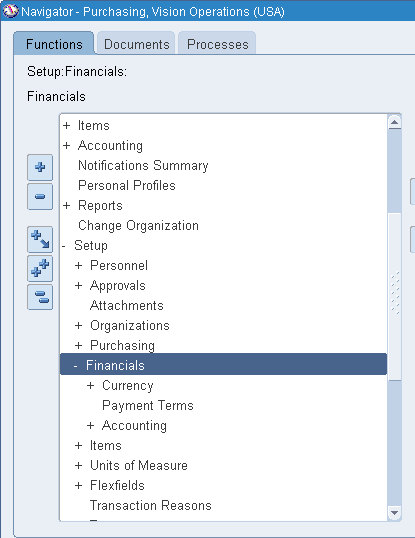
Setup > Financial > Accounting > Control Purchasing Period


Then


Choose Fiscal Year or Period Name accordingly 


Change Periods Status as "Open"


Save


Now Your's Purchasing Period Opened .Ensure that the  Purchasing Period  has Status Open


"How can Open Oracle Apps General Ledger , Inventory and Purchasing Modules Periods in Oracle Apps R12"


“A GUIDE FOR ORACLE E-BUSINESS SUITE” –A complete Solution and Learning platform For Oracle Apps R12/11i, Training, India Localization, Technical, P2P, O2C, Drop-shipment, AR/AP Cycle, Implementation, Bug or error in Oracle Apps R12/11i, Up-gradation, Support, Alert, Personalization, Discoverer management, OracleApps R12/11i Module, Finance, SCM, MRP, ASCP, WIP, BOM, FA, AP, AR, OM, INV, AOL, MOAC, TCA structure, Project Accounting, CM, Functional,Oracle DBA, ERP, Techno-functional, OAF, Oracle Apps Interview Question and Error in Oracle apps R12/11i. For More Information Visit on www.OracleAppsGuide.com Or Subscribe your email-id on OracleAppsGuide