Showing posts with label Finance. Show all posts

How can be add month in calendar or defining new fiscal year in oracle apps R12


How can add month in calendar or defining new fiscal year in oracle apps R12 

Or

How can add an Adjustment Period in Calendar 


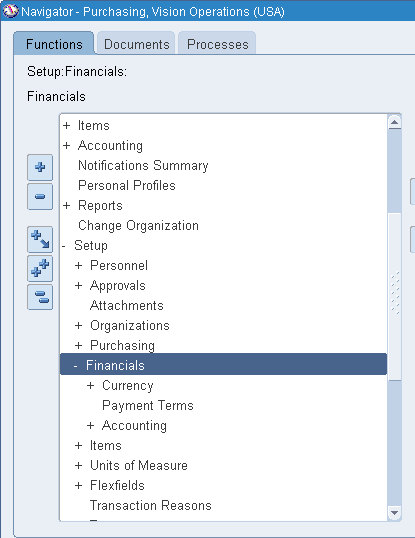
Go to General Ledger ,Vision Operation (USA) < Setup 


Then Setup < Financials < Calendars < Accounting


Now Query (F11) "Accounting"  then press Ctrl + F11 


Now Go to File < New and add a new line Accordingly .


Fill all mandatory field as required .


Now Save 


Finally, Your's Month add in Calendar .


Note -:  Use the following Query to check the status of the Periods Details accordingly :


select a.period_name,
       a.period_num,
       a.gl_status,
       b.po_status,
       c.ap_status
from
   (select period_name, period_num, 
    decode(closing_status,'O','Open',
                          'C','Closed',
                          'F','Future',
                          'N','Never',
           closing_status) gl_status
    from gl_period_statuses
    where application_id = 101
    and start_date >= '01-JAN-98
    and end_date < '01-JAN-99'
    and set_of_books_id = &&set_of_books_id) a,
   (select period_name, 
    decode(closing_status,'O','Open',
                          'C','Closed',
                          'F','Future',
                          'N','Never',
           closing_status) po_status
    from gl_period_statuses
    where application_id = 201
    and start_date >= '01-JAN-15'
    and end_date < '01-JAN-16'
    and set_of_books_id = &&set_of_books_id) b,
   (select period_name,
    decode(closing_status,'O','Open',
                          'C','Closed',
                          'F','Future',
                          'N','Never',
           closing_status) ap_status
    from gl_period_statuses
    where application_id = 200
    and start_date >= '01-JAN-15'
    and end_date < '01-JAN-16'
    and set_of_books_id = &&set_of_books_id) c
where a.period_name = b.period_name
and   a.period_name = c.period_name
order by a.period_num


“A GUIDE FOR ORACLE E-BUSINESS SUITE” –A complete Solution and Learning platform For Oracle Apps R12/11i, Training, India Localization, Technical, P2P, O2C, Drop-shipment, AR/AP Cycle, Implementation, Bug or error in Oracle Apps R12/11i, Up-gradation, Support, Alert, Personalization, Discoverer management, OracleApps R12/11i Module, Finance, SCM, MRP, ASCP, WIP, BOM, FA, AP, AR, OM, INV, AOL, MOAC, TCA structure, Project Accounting, CM, Functional,Oracle DBA, ERP, Techno-functional, OAF, Oracle Apps Interview Question and Error in Oracle apps R12/11i. For More Information Visit on www.OracleAppsGuide.com Or Subscribe your email-id on OracleAppsGuide .


How can Open Oracle Apps General Ledger , Inventory and Purchasing Modules Periods in Oracle Apps R12


How can Open Oracle Apps General Ledger Period in Oracle Apps R12

Or 

Step to Open Oracle Apps General Ledger Period in Oracle Apps R12


Note -: Whenever you do Receiving inventory transactions, you often get errors if your Inventory/ purchasing/ GL periods are not open.

Here is the navigation where you can setup the periods for your material receipts:

Go to

Setup > Financial > Accounting > Open and Close periods

-OR-

Setup > Open and Close periods


Click On Open/Close


 Select Ledger Name and Period Accordingly 


Click On Open Periods 


Choose Target Period 


Once Check the Concurrent Program Status .


Now Your's General Ledger Period Opened .Ensure that the  GL Period  has Status Open.


How can Open Oracle Apps Inventory Period in Oracle Apps R12

Or 


Step to Open Oracle Apps Inventory Period in Oracle Apps R12


Go to

Inventory > Accounting close cycle > Inventory Accounting Periods


Choose Respective Inventory Organization


Click on Change Status then OK


Now Your's Inventory Period Opened .


How can Open Oracle Apps Purchasing Period in Oracle Apps R12

Or 

Step to Open Oracle Apps Purchasing Period in Oracle Apps R12


Here is the navigation where you can setup the periods 

Go to

Setup > Financial > Accounting > Control Purchasing Period


Then


Choose Fiscal Year or Period Name accordingly 


Change Periods Status as "Open"


Save


Now Your's Purchasing Period Opened .Ensure that the  Purchasing Period  has Status Open


"How can Open Oracle Apps General Ledger , Inventory and Purchasing Modules Periods in Oracle Apps R12"


“A GUIDE FOR ORACLE E-BUSINESS SUITE” –A complete Solution and Learning platform For Oracle Apps R12/11i, Training, India Localization, Technical, P2P, O2C, Drop-shipment, AR/AP Cycle, Implementation, Bug or error in Oracle Apps R12/11i, Up-gradation, Support, Alert, Personalization, Discoverer management, OracleApps R12/11i Module, Finance, SCM, MRP, ASCP, WIP, BOM, FA, AP, AR, OM, INV, AOL, MOAC, TCA structure, Project Accounting, CM, Functional,Oracle DBA, ERP, Techno-functional, OAF, Oracle Apps Interview Question and Error in Oracle apps R12/11i. For More Information Visit on www.OracleAppsGuide.com Or Subscribe your email-id on OracleAppsGuide


Link Between AP(Account Payable),GL(General Ledger) and SLA(Sub Ledger Accounting _XLA)


Complete relation Query for SLA(Sub Ledger Accounting _XLA),AP(Account Payable) and GL(General Ledger) Links in oracle apps r12 
Or 
Link Between AP(Account Payable),GL(General Ledger) and SLA(Sub Ledger Accounting _XLA)


SELECT DISTINCT GJH.PERIOD_NAME, TRUNC (GJH.CREATION_DATE) GL_DATE,
                GJH.JE_SOURCE, GJH.JE_CATEGORY, GJH.CURRENCY_CODE,
                GJL.DESCRIPTION, GJL.REFERENCE_5, GJL.REFERENCE_10,
                GJL.ACCOUNTED_CR, GJL.ACCOUNTED_DR, GJL.EFFECTIVE_DATE,
                GJL.REFERENCE_1, GCC.SEGMENT1, GCC.SEGMENT2, GCC.SEGMENT3,
                GCC.SEGMENT4, GCC.SEGMENT5, GCC.SEGMENT6, GCC.SEGMENT7,
                AERLA.JUSTIFICATION, AERLA.PROJECT_NUMBER,
                AERLA.EXPENDITURE_ITEM_DATE, AERLA.RECEIPT_CURRENCY_CODE
           FROM APPS.GL_JE_HEADERS GJH,
                APPS.GL_JE_LINES GJL,
                APPS.GL_CODE_COMBINATIONS GCC,
                APPS.GL_IMPORT_REFERENCES GIR,
                APPS.XLA_AE_LINES XAL,
                APPS.XLA_AE_HEADERS XAH,
                APPS.AP_INVOICES_ALL AIA,
                APPS.AP_INVOICE_LINES_ALL AILA,
                APPS.AP_INVOICE_DISTRIBUTIONS_ALL AIDA,
                APPS.AP_EXPENSE_REPORT_HEADERS_ALL AERHA,
                APPS.AP_EXPENSE_REPORT_LINES_ALL AERLA
--APPS.XLA_EVENTS XE,
--XLA.XLA_TRANSACTION_ENTITIES XTE,
--APPS.XLA_DISTRIBUTION_LINKS XDL,
WHERE           GJH.JE_HEADER_ID = GJL.JE_HEADER_ID
            AND GJL.CODE_COMBINATION_ID = GCC.CODE_COMBINATION_ID
            AND GJL.JE_HEADER_ID = GIR.JE_HEADER_ID
            AND GJL.JE_LINE_NUM = GIR.JE_LINE_NUM
            AND GIR.GL_SL_LINK_ID = XAL.GL_SL_LINK_ID
            AND GIR.GL_SL_LINK_TABLE = XAL.GL_SL_LINK_TABLE
            AND XAL.APPLICATION_ID = XAH.APPLICATION_ID
            AND AIA.INVOICE_ID = AILA.INVOICE_ID
            AND AIA.INVOICE_ID = AIDA.INVOICE_ID
            AND AILA.LINE_NUMBER = AIDA.DISTRIBUTION_LINE_NUMBER
            AND AERHA.REPORT_HEADER_ID = AERLA.REPORT_HEADER_ID
            AND AIA.INVOICE_ID = AERHA.VOUCHNO
            AND AIDA.INVOICE_LINE_NUMBER = AERLA.DISTRIBUTION_LINE_NUMBER
            AND AIDA.ACCOUNTING_EVENT_ID = XAH.EVENT_ID
            AND XAL.AE_HEADER_ID = XAH.AE_HEADER_ID
            AND (    GJH.JE_SOURCE = 'Payables'
                 AND GJH.JE_CATEGORY = 'Purchase Invoices'
                )
            AND GJH.CURRENCY_CODE = 'INR'
--AND XAH.EVENT_ID=XE.EVENT_ID
--AND XAH.APPLICATION_ID=XE.APPLICATION_ID
--AND XE.ENTITY_ID=XTE.ENTITY_ID
--AND XE.APPLICATION_ID=XTE.APPLICATION_ID
--AND XTE.SOURCE_ID_INT_1=AIA.INVOICE_ID
--AND XAH.APPLICATION_ID=XTE.APPLICATION_ID
--AND XAH.ENTITY_ID=XTE.ENTITY_ID
--AND XDL.APPLICATION_ID=XAH.APPLICATION_ID
--AND AIDA.INVOICE_DISTRIBUTION_ID=XDL.SOURCE_DISTRIBUTION_ID_NUM_1
--AND XDL.AE_HEADER_ID=XAH.AE_HEADER_ID
--AND XE.EVENT_ID=AIDA.ACCOUNTING_EVENT_ID
--AND AERHA.INVOICE_NUM LIKE '%12345%'
--AND GJH.PERIOD_NAME = 'AUG-15'


“A GUIDE FOR ORACLE E-BUSINESS SUITE” –A complete Solution and Learning platform For Oracle Apps R12/11i, Training, India Localization, Technical, P2P, O2C, Drop-shipment, AR/AP Cycle, Implementation, Bug or error in Oracle Apps R12/11i, Up-gradation, Support, Alert, Personalization, Discoverer management, OracleApps R12/11i Module, Finance, SCM, MRP, ASCP, WIP, BOM, FA, AP, AR, OM, INV, AOL, MOAC, TCA structure, Project Accounting, CM, Functional,Oracle DBA, ERP, Techno-functional, OAF, Oracle Apps Interview Question and Error in Oracle apps R12/11i. For More Information Visit on www.OracleAppsGuide.com Or Subscribe your email-id on OracleAppsGuide

How to release REC EXCEPTION [Receiving Exception] hold on invoices in r12

How to release REC EXCEPTION [Receiving Exception] hold on invoices in R12


Follow given steps to implement the solution in your instance follow the below steps:

1-: Go to Purchasing Application

2-: Receipts and query the Receipt [which is created against the PO]


3-: Now Check Receiving Exception check box is unchecked. [It should be unchecked]


Note-: if Receiving Exception check box is not available then do the Show Field and choose Receiving Exception then check.


4-: Now revalidate the invoice to release the hold.


Solution For -:How to release REC EXCEPTION [Receiving Exception] hold on invoices
Oracle Payables - Version 12.0.0 to 12.1.3 [Release 12.0 to 12.1]
For More Information Visit on www.OracleAppsGuide.comOr Subscribe your email-id on OracleAppsGuide