Showing posts with label INV. Show all posts

How can Open Oracle Apps General Ledger , Inventory and Purchasing Modules Periods in Oracle Apps R12


How can Open Oracle Apps General Ledger Period in Oracle Apps R12

Or 

Step to Open Oracle Apps General Ledger Period in Oracle Apps R12


Note -: Whenever you do Receiving inventory transactions, you often get errors if your Inventory/ purchasing/ GL periods are not open.

Here is the navigation where you can setup the periods for your material receipts:

Go to

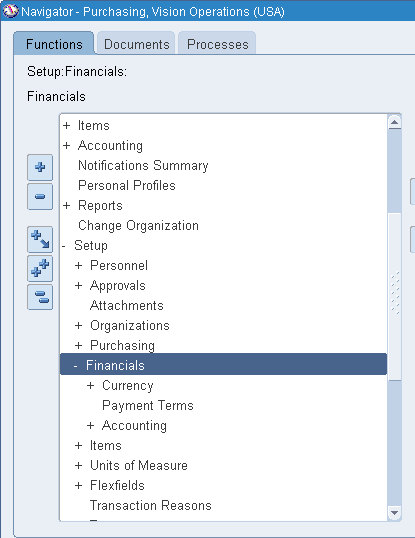
Setup > Financial > Accounting > Open and Close periods

-OR-

Setup > Open and Close periods


Click On Open/Close


 Select Ledger Name and Period Accordingly 


Click On Open Periods 


Choose Target Period 


Once Check the Concurrent Program Status .


Now Your's General Ledger Period Opened .Ensure that the  GL Period  has Status Open.


How can Open Oracle Apps Inventory Period in Oracle Apps R12

Or 


Step to Open Oracle Apps Inventory Period in Oracle Apps R12


Go to

Inventory > Accounting close cycle > Inventory Accounting Periods


Choose Respective Inventory Organization


Click on Change Status then OK


Now Your's Inventory Period Opened .


How can Open Oracle Apps Purchasing Period in Oracle Apps R12

Or 

Step to Open Oracle Apps Purchasing Period in Oracle Apps R12


Here is the navigation where you can setup the periods 

Go to

Setup > Financial > Accounting > Control Purchasing Period


Then


Choose Fiscal Year or Period Name accordingly 


Change Periods Status as "Open"


Save


Now Your's Purchasing Period Opened .Ensure that the  Purchasing Period  has Status Open


"How can Open Oracle Apps General Ledger , Inventory and Purchasing Modules Periods in Oracle Apps R12"


“A GUIDE FOR ORACLE E-BUSINESS SUITE” –A complete Solution and Learning platform For Oracle Apps R12/11i, Training, India Localization, Technical, P2P, O2C, Drop-shipment, AR/AP Cycle, Implementation, Bug or error in Oracle Apps R12/11i, Up-gradation, Support, Alert, Personalization, Discoverer management, OracleApps R12/11i Module, Finance, SCM, MRP, ASCP, WIP, BOM, FA, AP, AR, OM, INV, AOL, MOAC, TCA structure, Project Accounting, CM, Functional,Oracle DBA, ERP, Techno-functional, OAF, Oracle Apps Interview Question and Error in Oracle apps R12/11i. For More Information Visit on www.OracleAppsGuide.com Or Subscribe your email-id on OracleAppsGuide


AP, AR, GL, INV, PA, FA, PO, TCA, Workflow - Interface and Base table in Oracle Apps R12


Main Interface and Base table in Oracle Apps R12


GL Module (General Ledger Module tables in Oracle Apps R12)
Interface Table
Base Table
gl_interface
gl_budget_interface
gl_je_batches
gl_je_headers
gl_je_lines
gl_je_sources
gl_je_categories
gl_sets_of_books
gl_daily_rates
gl_balances
gl_periods
gl_period_sets
gl_code_conbinations
AR Module (Account Receivable Module tables in Oracle Apps R12)
Interface Table
Base Table
ra_customers_interface_all  
ra_contact_phones_int_all
ra_customer_profiles_int_all
hz_parties hz_cust_accounts
hz_cust_acct_sites_all
hz_cust_sit_use_all
hz_party_sites
hz_locations
hz_party_site_uses
hz_customer_profiles
hz_organization_profiles
hz_person_profiles

ra_interface_lines_all
ra_interface_distributions_all
ra_interface_salescredits_all
ra_customer_trx_all
ra_customer_trx_lines_all
ra_cust_trx_line_gl_dist_all
ra_cust_trx_types_all
ar_payment_schedules_all
ra_batch_sources_All
ar_vat_tax_all
ra_terms ar_periods
ar_period_types
OM Module (Order Management Module tables in Oracle Apps R12)
Interface Table
Base Table
oe_headers_iface_all
oe_lines_iface_all
oe_actions_iface_all
oe_order_headers_all
oe_order_lines_all
oe_order_sources
oe_transaction_types_tl
oe_transaction_types_all
INV Module (Inventory Module tables in Oracle Apps R12)
Interface Table
Base Table
mtl_system_items_interface
mtl_item_categories_interface
mtl_item_revisions_interface
mtl_interface_errors
mtl_system_items_b
mtl_system_items_tl
mtl_item_locations
mtl_item_categories
mtl_item_revisions_b
mtl_parameters
hr_all_organizations_units
cst_item_costs
qp_list_headers
jft_rs_salesreps
Workflow Tables tables in Oracle Apps R12
Interface Table
Base Table

wf_items
wf_process_activities
wf_item_activity_statuses
wf_item_types_tl
PO Module (Purchase Order tables in Oracle Apps R12)
Interface Table
Base Table
PO REQUISITIONS
po_requistitions_interface_all
po_req_dist_interface_all

PURCHASE ORDERS
po_headers_interface
po_lines_interface
po_distributions_interface


PO VENDORS
po_vendors
po_vendor_sites_all
po_vendor_contacts

PO REQUISITIONS
po_requisition_headers_all
po_requisition_lines_all
po_req_distributions_all


PURCHASE ORDERS
po_headers_all
po_lines_all
po_line_locations_all
po_distributions_all
AP Module (Account Payables tables in Oracle Apps R12)
Interface Table
Base Table
ap_invoices_interface
ap_invoice_lines_interface
ap_invoices_all
ap_invoice_distributions_all
ap_payments_schedules_all
FA Module (Fixed Asset tables in Oracle Apps R12)
Interface Table
Base Table
fa_inv_interface
fa_production_interface
fa_mass_additions
fa_additions_b
fa_additions_tl
fa_books
fa_deprn_summary
fa_deprn_details
fa_deprn_history
fa_retirements
PA  Module (Project Accounting in Oracle Apps R12)
Interface Table
Base Table

pa_tasks
pa_expenditure_items_all
pa_expenditures_all
pa_transaction_constrols
pa_projects_all
pa_budget_versions
pa_resource_assigments
TCA Architecture (Trading Community Architecture tables in Oracle Apps R12)
Interface Table
Base Table

hz_parties hz_cust_accounts
hz_cust_acct_sites_all
hz_cust_sit_use_all
hz_party_sites
hz_locations
hz_party_site_uses
hz_customer_profiles
hz_organization_profiles
hz_person_profiles


“A GUIDE FOR ORACLE E-BUSINESS SUITE” –A complete Solution and Learning platform For Oracle Apps R12/11i, Training, India Localization, Technical, P2P, O2C, Drop-shipment, AR/AP Cycle, Implementation, Bug or error in Oracle Apps R12/11i, Up-gradation, Support, Alert, Personalization, Discoverer management, OracleApps R12/11i Module, Finance, SCM, MRP, ASCP, WIP, BOM, FA, AP, AR, OM, INV, AOL, MOAC, TCA structure, Project Accounting, CM, Functional,Oracle DBA, ERP, Techno-functional, OAF, Oracle Apps Interview Question and Error in Oracle apps R12/11i. For More Information Visit on www.OracleAppsGuide.com Or Subscribe your email-id on OracleAppsGuide

Setup Step for ECO Cycle (Engineering Change Order) in Oracle Apps


Setup step for ECO Cycle (Engineering Change Order) in Oracle Apps


  • Defining ECO Types
  • Defining ECO Auto numbering
  • Defining ECO Priorities
  • Defining ECO Reasons
  • Defining ECO Approval Lists
  • Starting the Auto Implement Manager
  • Engineering Profile Options and Security Functions 


Defining Engineering Change Orders


  • Creating an ECO
  • Viewing ECO Approval Status
  • Rescheduling an ECO or Revised Items
  • Changing the ECO Status
  • Defining Implementation Costs
  • Defining an ECO Revision
  • Defining ECO Revised Items
  • Viewing ECO Schedule History
  • Defining Revised Components
  • Viewing Item Revisions
  • Assigning or Deleting Substitute Components
  • Assigning Reference Designators
  • Attaching Files to ECOs
  • Engineering Change Orders Field


ECO Statuses


  • ECO Revised Item Statuses
  • ECO Approval Statuses
  • Disposition Field


ECO Reports in Oracle Apps


  • Engineering Change Order Approval Lists Report
  • Engineering Change Order Detail Report
  • Engineering Change Order Priorities Report
  • Engineering Change Order Reasons Report
  • Engineering Change Order Schedule Report


“A GUIDE FOR ORACLE E-BUSINESS SUITE” –A complete Solution and Learning platform For Oracle Apps R12/11i, Training, India Localization, Technical, P2P, O2C, Drop-shipment, AR/AP Cycle, Implementation, Bug or error in Oracle Apps R12/11i, Up-gradation, Support, Alert, Personalization, Discoverer management, OracleApps R12/11i Module, Finance, SCM, MRP, ASCP, WIP, BOM, FA, AP, AR, OM, INV, AOL, MOAC, TCA structure, Project Accounting, CM, Functional,Oracle DBA, ERP, Techno-functional, OAF, Oracle Apps Interview Question and Error in Oracle apps R12/11i. For More Information Visit on www.OracleAppsGuide.com Or Subscribe your email-id on OracleAppsGuide

ECO Cycle (Engineering Change Order) in Oracle Apps


ECO Cycle (Engineering Change Order) in Oracle Apps


Step 1- Go to the Engineering Change Order Responsibility 


Step 2- Please Define the Engineering Change Order/Query 


Step 3- Now Click on Revision Item 


Step 4 -  Save the Form .


Step 5 - Click on Tools and Release ECO (Engineering Change Order) Accordingly . 


Note - You can Check by 


SELECT * FROM APPS.ENG_REVISED_ITEMS


Step 5 - : Now Implement ECO (Engineering Change Order)


Step 6- : Now Go to View > Request > Find the "Engineering Change Order" Program .


“A GUIDE FOR ORACLE E-BUSINESS SUITE” –A complete Solution and Learning platform For Oracle Apps R12/11i, Training, India Localization, Technical, P2P, O2C, Drop-shipment, AR/AP Cycle, Implementation, Bug or error in Oracle Apps R12/11i, Up-gradation, Support, Alert, Personalization, Discoverer management, OracleApps R12/11i Module, Finance, SCM, MRP, ASCP, WIP, BOM, FA, AP, AR, OM, INV, AOL, MOAC, TCA structure, Project Accounting, CM, Functional,Oracle DBA, ERP, Techno-functional, OAF, Oracle Apps Interview Question and Error in Oracle apps R12/11i. For More Information Visit on www.OracleAppsGuide.com Or Subscribe your email-id on OracleAppsGuide


Error "You have exceeded the transaction quantity". Precision Restriction for Quantity Field Up To 6 Decimal Places Performing Lot Receipts (Doc ID 464983.1)


Error "You have exceeded the transaction quantity". 


Applies to: 

Information in this document applies to any platform.

FORM:RCVRCERC.FMB - Enter Receipts GUI

FORM:RCVTXERT.FMB - Enter Receiving Transactions GUI

FORM:RCVTXERE.FMB - Enter Returns GUI

FORM:RCVTXECO.FMB - Enter Corrections GUI

"You have exceeded the transaction quantity"


Symptoms:

"You have exceeded the transaction quantity"

Note: Internal error message may indicate this message:
INV_QUANTITY_TOO_BIG

Steps:
  1. Go to Receiving Screen
  2. Enter the qty like 7200.00000489 (6 digits restriction makes it 7200.000005)
  3. Go to Lot/Serial form
  4. Enter lot number and qty as 7200.00001 (which was rounded to 5 digits)
  5. Message "you have exceeded the transaction quantity "
Cause Can Be-:


a) Restriction of precision support up to 6 decimal places were added for the quantity field 

b) Comparing the transaction qty entered in receiving forms and the lot quantity entered in lot-entry form after rounding to 5 decimal precision.

Quantity Precision support from now on will be as follows:
Receiving supports unlimited precision in Receiving forms.
Core Inventory's lot entry block still supports only 5 decimal precision. 
Important: The revised Quantity Precision support affects any quantities entered in all of the receiving forms (not just LOT based items).

Solution:

To implement the solution, please execute the following steps:

1. Download and review the readme for Patch 5880504 

2. Apply Patch 5880504 on a non-Production instance

3. Confirm the following file version:
     $AU_TOP/resource/RCVRCERL.plx  115.157.11510.45
     $AU_TOP/resource/RCVTXECO.plx  115.67.11510.20
     $AU_TOP/resource/RCVTXERT.plx  115.110.11510.22
     $PO_TOp/forms/US/RCVTXERE.fmb  115.79.11510.9
   You can use the commands like the following:
    strings -a $AU_TOP/resource/RCVRCERL.plx | grep 'Header:'

4. Retest the issue

5. If the issue is resolved, migrate the solution as appropriate to other instances


References:

BUG:6000073 - RECEIVING, INVENTORY AND PO SHOULD ALL SUPPORT 15 DECIMAL PRECISION
BUG:7626008 - DECIMAL POSITIONS NOT CONSISTENT ON RCV FORMS; CANNOT RETURN SMALL QTY


BUG:5880504 - ONDEMAND: OUT TO 9-10 DECIMAL PLACES, RECEIVING TRANSACTIONS ROUNDING ONLY TO 5


Note- All Reference Taken from Oracle Forum and manipulate then to make better understandable for Oracle Apps Technical and Oracle Apps Functional Developer .


For More Information Visit on www.OracleAppsGuide.comOr Subscribe your email-id on OracleAppsGuide. For live issue discussion, Solution and Error in Oracle Apps R12 and in Oracle Apps 11I ;Please visit on Oracle Apps Guide.